Caregiver mobile app

Care, from wherever you are.

The MIA caregiver app gives family a simple way to guide the day, send reassurance, and stay close without hovering.

MIAConnected
MomToday looks calm
3messages
2events
1tablet
80%battery
Send message Start video call Add medication Update photo frame

What the app makes easier

Care tasks,
without the scramble.

From one mobile app, caregivers can send comfort, plan routines, manage the tablet, start calls, and respond when their loved one asks for help.

10Care areas
01Family control point
24hRecent activity view

Calls and reassurance

When they need you, you can be there.

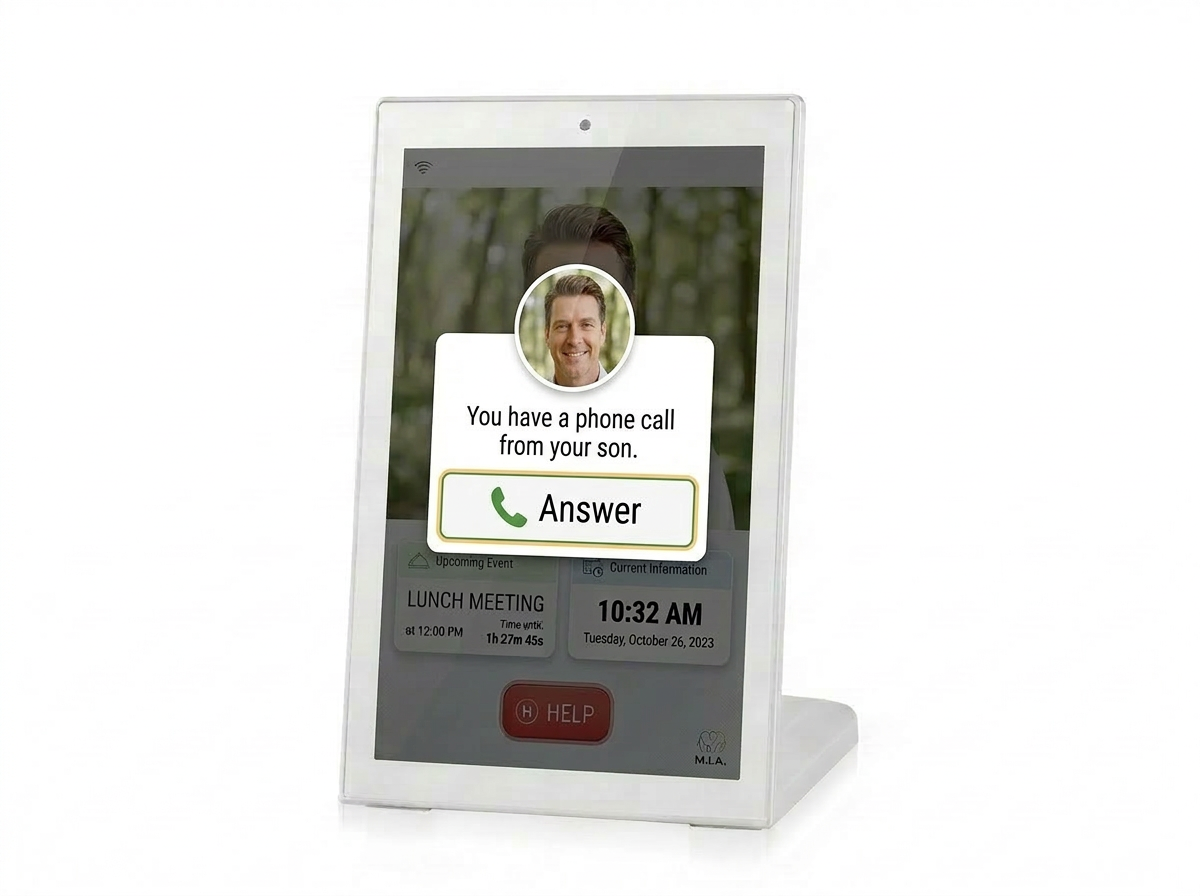
Start an audio or video call, respond to a "Please call me" request, and help your loved one feel seen in the moments that matter.

MIA tablet showing an incoming family call

Feature guide

Everything in the caregiver app, explained by the relief it creates.

01

A clear home for care

  • See the selected patient, caregiver profile, and current care context at a glance.
  • Jump quickly into messages, events, medication, activity, tablets, radio, photos, and calls.
  • Switch between linked patients when one caregiver supports more than one person.
  • Use simple status indicators to understand what needs attention.
  • Return to the home view easily when moving between care tasks.
02

Messages that feel personal

  • Send a quick note, longer message, image, video, or voice-style attachment to the tablet.
  • Use speech-to-text when it is easier to speak than type.
  • Record a short video message from the phone and send it as reassurance.
  • Review recent messages from the last day, including media previews and delivery context.
  • Remove old messages so the patient tablet stays clean and manageable.
03

Events and routines made visible

  • Create appointments, visits, meals, outings, and other reminders with a clear date and time.
  • Add helpful details so the tablet can explain what is happening next.
  • Choose whether the reminder should be spoken aloud on the tablet.
  • See current events and remove anything that no longer applies.
  • Add your caregiver photo so event prompts feel more familiar on the tablet.
04

Medication support you can shape

  • Create medication plans with name, dose, unit, instructions, times, and urgency.
  • Set plans as daily, weekly, specific days, or once-off reminders.
  • Attach a pill photo or custom reminder video to make the prompt easier to recognize.
  • Record medication intro videos and medicine-specific explainer clips.
  • Edit or remove plans as prescriptions and routines change.
05

Real calls, right from the app

  • Start an audio call when a quick check-in is enough.
  • Start a video call when seeing each other matters.
  • Keep the phone awake during active calls so the connection is not interrupted.
  • See clear call status while the tablet answers, connects, or ends.
  • Respond quickly when the patient presses "Please call me" on the tablet.
06

Tablet settings without being there

  • Adjust quiet hours, downtime, dimming, brightness, volume, and display behavior.
  • Choose whether the tablet shows weather, day of week, quotes, photo frame, idle focus, or welcome video.
  • Set the patient timezone and use suggested timezone guidance from linked tablet information.
  • Pause reminders temporarily when the day needs a different rhythm.
  • Generate a pairing code when setting up a new patient tablet.
07

Know how the tablet is doing

  • See linked tablets in one place with status, battery, charging, health, and network details.
  • Refresh device status when you want a more current picture.
  • Apply tablet-specific overrides for volume, brightness, quiet hours, weather, day display, and timezone.
  • Use patient defaults for most tablets, and override only the device that needs different behavior.
  • Keep setup and support easier for families managing more than one device.
08

Photos, radio, and familiar moments

  • Add photos and captions to the tablet photo frame.
  • Manage the slideshow timing and whether the photo frame appears.
  • Enable radio shows, browse episodes, and start playback on the tablet.
  • Use radio as a gentle, familiar activity without asking the patient to manage a complicated app.
  • Keep memory and comfort content fresh from your phone.
09

Custom videos for the moments that matter

  • Record short personal videos for message arrivals, medication prompts, and event reminders.
  • Review videos before assigning them to the right reminder moment.
  • Upload caregiver-recorded clips so the tablet speaks with a familiar presence.
  • Refresh or replace videos as care needs change.
  • Use short, focused clips that support the routine instead of overwhelming it.
10

Secure access and helpful alerts

  • Sign in with caregiver credentials and keep access tied to the right account.
  • Stay connected to the patients assigned to your care role.
  • Receive caregiver alerts on the phone for moments that need attention.
  • Refresh lists when needed and recover from loading errors with retry states.
  • Use camera, microphone, notifications, and storage permissions only when those features need them.

Mobile companion

Built for real family care.

Always closeThe app keeps common care actions on the phone families already carry.
Patient-specificMessages, events, medications, settings, photos, and calls follow the selected loved one.
Tablet connectedCaregiver changes flow through to the MIA tablet so the patient experience stays simple.

MIA is coming

Support them without hovering over them.

The caregiver app is designed to make family support feel calmer, clearer, and easier to share.